
FIFO Accounting in QuickBooks
Estimated reading time: 4 minutes
By default QuickBooks Desktop Enterprise uses an average cost method when inventory is sold. There is another option available. This post explains FIFO accounting in QuickBooks and why it may be right for your company.
The Average Cost Method
By default, QuickBooks Enterprise uses an average cost method when inventory is sold. Here is an example.
We buy 1 unit of Part A for $5.00. We buy another unit of Part A for $10.00. We now have the following formula:
Total Quantity 2/Total Cost: $15.00 = $7.50 average cost per unit.
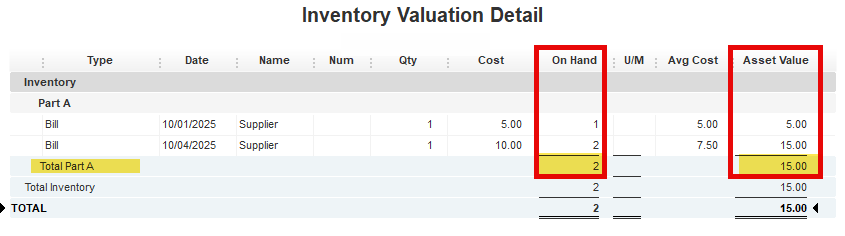
By default, QuickBooks will use an average of $7.50 when each of the two parts are sold.

FIFO Accounting in QuickBooks
FIFO is another option and is available in QuickBooks Desktop Enterprise. This feature may be activated in Advanced Inventory Settings.
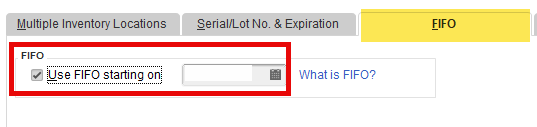
Before activating this feature, I suggest making a backup of your company file. You can also create a test copy.
FIFO will now create pricing layers and use the cost of the first items received for the cost of goods sold.
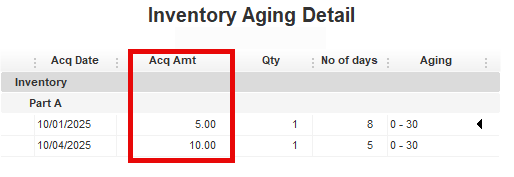
When the first part is sold, QuickBooks will use the $5.00 cost of the first unit purchased.
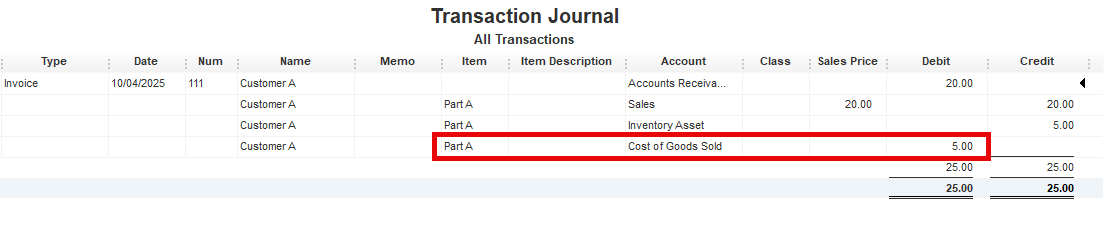
When the second unit is sold, QuickBooks will use the $10.00 cost of the second unit.

Financial Implications of Changing
I suggest contacting your tax advisor, business consultant, or QuickBooks ProAdvisor before making this change. This can have an impact on your bottom line. While it is a timing difference, this change can cross tax years and impact taxation brackets.
In our example, if we sold 1 of part A using the average cost method, we would have a tax deduction of $7.50. If we only sold 1 of part A in the current tax year under FIFO, we could only deduct $5.00.
In our example, this is not significant, but multiplied over hundreds of items, it could have a larger impact.
Filing Requirements
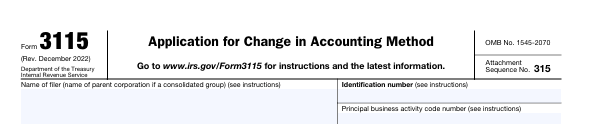
Before making this change, I strongly advise contacting your tax professional. You may be required to complete some tax forms with the IRS and your state. Here is an example of one IRS form you may be required to file:
Summary
This can be a very important change to your inventory workflow. In general, the older units with a lower cost are used under FIFO. This can mean an initial higher income over the short term. It is important to work with an advisor to make sure you plan correctly for the future increases in cost of goods sold.
Support Links
FIFO Options in QuickBooks Desktop
Inventory valuation methods for cost accounting
Please note: the above link refers to QuickBooks Online FIFO accounting. This is the default valuation method in the Online Edition and provides a good explanation of FIFO accounting.