
Automatic Price Updates in QuickBooks
Is there an easy way to keep your prices updated in QuickBooks? You bet!
Automatic price updates in QuickBooks can adjust the sales price when the cost from your supplier changes. Let’s look at an example using a sample item.
You have an item that you purchased from your supplier for $50. Your sales price is $100. You have a 100% markup.

When you create an invoice, the sales price of $100 will automatically be entered on the invoice.

But sometimes prices from your supplier increase. When this happens, you need to adjust your sales price to keep the same markup. In our example, we find the price has increased from $50 to $60.

Unless you update the item record to show a new sales price of $120, your markup now falls to 66.67%. You are not getting the markup you expected.

If you have a high-volume business, this could often happen with dozens of products. So how can you keep the sales prices updated? QuickBooks Enterprise has a hidden jewel for this situation.
Setting Up Automatic Price Updates in QuickBooks
Hidden in the preference settings is a feature that will automatically update the sales price of an item when you reorder from your supplier at a new price. From the top menu, select Edit > Preferences > Items & Inventory. Finally, select “Automatic Cost & Price Updates…”

Once you click on the option above, a window opens and allows you to select the preference settings.

- The Markup option allows you to chose a) Percent over Cost or b) Amount over Cost
- You are then given an option to select if you want QuickBooks to a) Ask about updating the item cost or sales price b) Always Update c) Never Update
- This feature can also be used with Inventory Assemblies.
Using Automatic Price Updates in QuickBooks
Once the automatic price update feature is enabled, a pop-up window will appear when a supplier changes prices. In our example, the supplier has increased the price from $50 to $60. The following window warns us that our markup will drop to 66.67% unless we update the price. By answering yes, QuickBooks will automatically update the price to $120 and keep the 100% margin.

Once you create a new Purchase Order and change the item to the new cost of $60 (instead of $50), QuickBooks will pop up with a message that the item’s cost has changed. It will give you the option to automatically update the item record with a new sales price!

The item record will now be updated with the new $120 price.

When creating an invoice for a customer, the new product price will show.

Where to Begin
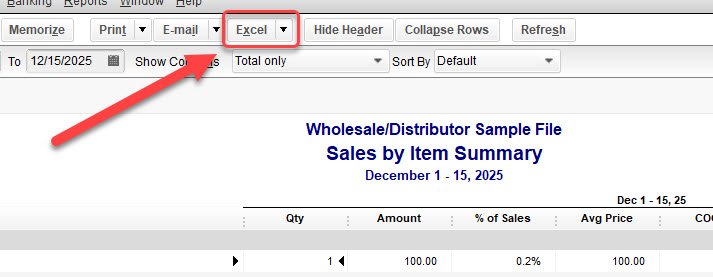
So where do you even begin? How can you review the current margins on your products? From the menu at the top, select Reports > Sales > Sales by Item Summary.

This report can also be downloaded to Excel by using the option at the top of the report window.
Updating All Your Prices
What if you need to review and update all your prices? Learn How to Update Item Prices in QuickBooks.