
Site Operations in QuickBooks Enterprise
Estimated reading time: 2 minutes
One feature of Advanced Inventory is Site Operations in QuickBooks Enterprise. You will need a Platinum or Diamond level subscription.
About Site Operations in QuickBooks Enterprise
Site operations can improve your inventory management workflow, allowing you to more efficiently manage shipping and receiving.
How to Activate Site Operations
From the top menu, select Edit > Preferences. On the left, select Items & Inventory.
Select the “Company Preferences” tab at the top, then “Advanced Inventory Settings.”

At the top, select “Site Operations.” You will then see three options:
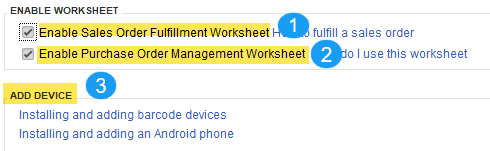
Sales Order Fulfillment
The Sales Order Fulfillment Worksheet provides a quick view of all outstanding sales orders and their fulfillment status.
Using the optional (free) Intuit warehouse app allows you to send pick lists and packing slips to a handheld device.
Purchase Order Management
The Purchase Order Management Worksheet provides a view of all open purchase orders and allows you to send them to warehouse workers as shipments are received. It can also track partial receipts.
Warehouse Manager App
The QuickBooks Warehouse Manager App can be downloaded on android and other select devices to send both purchase and sales orders for receiving a shipping. The app can sync with QuickBooks Enterprise, provide updates, and reduce paperwork in the warehouse.
Support Links
Support article for Site Operations
Use the Sales Fulfillment Worksheet