Skip to content

The new Intuit Enterprise Suite is here! Learn more. 

Ledger Consulting

Ledger Consulting

  • Home
  • QuickBooks SupportExpand
    • Intuit Enterprise Suite
    • QuickBooks Online
    • QuickBooks Desktop Support
    • Convert to QuickBooks Online
  • Inventory
  • Analytics
  • Insights
  • Get Help
Intuit Enterprise Suite is here. Learn More!

Ledger Consulting

The QuickBooks Insights Tab

March 16, 2021March 10, 2026

Need a quick overview of your business performance? The QuickBooks Insights tab is filled with customizable graphics and report links. This can be a great starting place to see a summary of your business progress.

Table of Contents
  • The QuickBooks Insights Tab is divided into 3 sections:
  • The Report Section
  • The Profit & Loss
  • The Previous Year Income Report
  • Top Customers by Sales
  • Income and Expense Trend
  • Business Growth
  • Net Profit Margin
  • Previous Year Expense Comparison
  • The Income Section
  • Printing the Reports from the QuickBooks Insights Tab
  • The QuickBooks Insights Tab

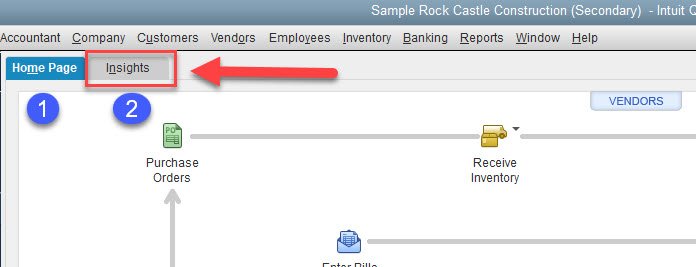
This little gem is hidden. At the upper left of your desktop homepage, there are two tabs:

  1. Home Page
  2. Insights
  • Insights Tab 1

Selecting the Insights tab will show a customizable summary of your business.


  • Insights Tab 2

The QuickBooks Insights Tab is divided into 3 sections:

  1. Report Section
  2. Income Section
  3. Expenses Section

  • Insight Panels

The Report Section

The top section can be customized to show up to 7 reports. You can select the reports at the upper right of the screen.

Company Insights Dash Board

Click the gear icon on the right to see the report option selection box below.

  • Customize Insights

Here is a snapshot of each report.

The Profit & Loss

  • The QuickBooks Insights Tab

The Previous Year Income Report

  • Prev Year Income Comparison

Top Customers by Sales

  • Top Customers by Sales

Income and Expense Trend

  • The QuickBooks Insights Tab

Business Growth

  • Business Growth

Net Profit Margin

  • Net Profit Margin

Previous Year Expense Comparison

  • Prev Yr Exp Comp

The Income Section

The Income Section shows invoices that are open, overdue, and paid in the last 30 days.

  • Income Section 1

Clicking on any of the boxes above—Unpaid Open Invoice, Unpaid Overdue, or Paid—will open the Income Tracker. This shows a more detailed view of your invoices and allows you to filter by customer, type, status, and date range.

You can also access the Income Tracker by using the menu at the top and selecting Customers > Income Tracker.

  • Income Tracker

Printing the Reports from the QuickBooks Insights Tab

The print box at the upper right will allow you to either print the reports or save them in a PDF format.

  • print

The QuickBooks Insights Tab

This is a great feature that can help you understand and analyze your business.


Post navigation

Previous Previous
Find Transactions by Dollar Amount in QuickBooks
NextContinue
Update Item Prices in QuickBooks

About the Blogger

Tim Plue
Contact Me

I am an Advanced Certified QuickBooks ProAdvisor and certified in the new Intuit Enterprise Suite. I can help you use the many features of QuickBooks to analyze and grow your business.

I have taught QuickBooks and bookkeeping classes for over 12 years. I help small business owners run their businesses using QuickBooks. I can meet you on-site or remotely.

Let's see what QuickBooks can do for your business!


Blog Topics

  • Intuit Enterprise Suite
  • QuickBooks Desktop Enterprise
  • QuickBooks Desktop Inventory
  • QuickBooks Online

Popular Pages

Intuit Enterprise Suite

QuickBooks Desktop Enterprise

QuickBooks Online

Inventory Management

QuickBooks Reporting

Getting Started with QuickBooks

Linkedin

Quick Links

QuickBooks Insights

About

Contact

© 2026 Ledger Consulting

Terms of Use

Scroll to top
  • Home
  • QuickBooks Support
  • Inventory
  • Analytics
  • Insights
  • Contact